Niara API
WebHook Notification
This API describes the schema for webhook calls sent by Niara when a event occurs.
The endpoint is intended for integration partners to understand the structure of webhook payloads, enabling correct processing and validation of incoming data.
Webhook Setup
Niara can notify your system in real time whenever an order or lost reservation changes. To enable this, you must register a publicly accessible HTTPS endpoint on your side that will receive the webhook payloads.
Step 1 — Register your endpoint
Go to Niara Configurations → Fluxo de Compra → Regras de Notificação and enter your webhook URL.
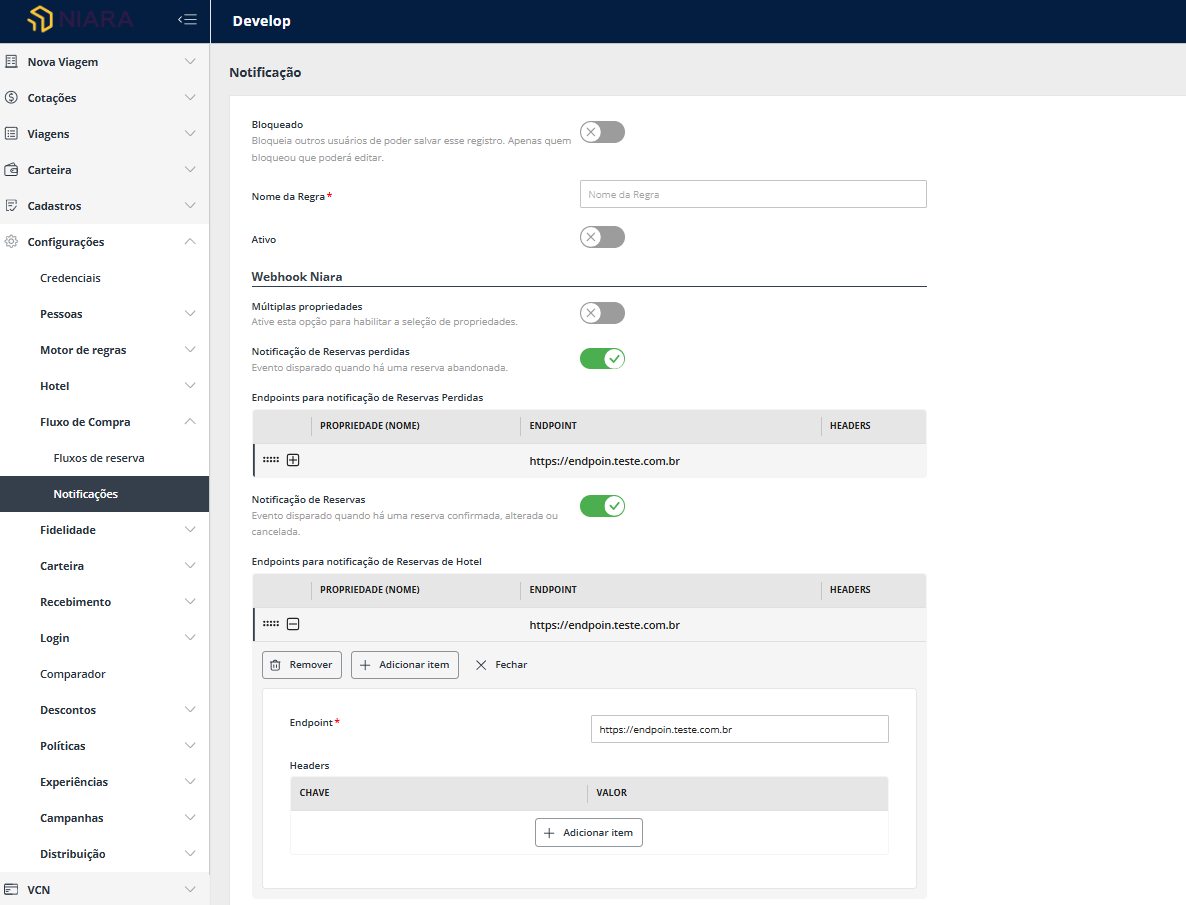
Step 2 — Handle incoming requests
Niara will send a POST request to your URL whenever a relevant event occurs. The request body will contain a JSON payload with the orderId and the eventyType.
Supported event types:
| Eventy type | Description |
|---|---|
ORDER_CHANGED | Fired when an order change occurs. |
LOST_RESERVATION_CHANGED | Fired when a lost reservation change occurs. |
Step 3 — Fetch the data
The webhook payload only contains the ID and event type. After receiving a notification, use the GET /orders/{order_id} or GET /lostReservations/{lostReservationId} endpoints to retrieve the full, up-to-date record.
Example flow:
Niara → POST https://your-system.com/webhook
        { "orderId": "BBOILYE", "eventyType": "ORDER_CHANGED" }

Your system → GET https://api.niara.tech/prod/orders/BBOILYE
              Authorization: Bearer <token>
Links and files
Authentication
- HTTP: Bearer Auth
Each request to the API must include an authentication token provided by the Niara team. The token is associated with a client registered in the Niara system.
The client must include this token in the Authorization header when making API requests:
Authorization: Bearer <token>
The token follows the JSON Web Token (JWT) format and its length may vary (between 640 and 2,000 characters).
| Security Scheme Type: | http |
|---|---|
| HTTP Authorization Scheme: | bearer |
| Bearer format: | JWT |